School project website
Present a class project, report or science fair entry as a website, with sections for your question, method and results.
A website is a great way to hand in a project. It can hold text, photos, tables and links in one place, and anyone with the link can open it on a phone or a laptop. With Kodebloc you describe the project, the AI builds the page, and you fill in your own research and results.
One thing to keep in mind from the start: the AI builds the website, but the project is yours. Use Kodebloc for the layout and the design, and write the facts, findings and conclusions yourself. That is what your teacher wants to see, and AI text can contain mistakes.
What to put on a project website
The right sections depend on the kind of project.
Science fair or experiment
- Question. What did you want to find out?
- Hypothesis. What did you expect to happen, and why?
- Materials. What you used.
- Method. The steps, in order, so someone else could repeat them.
- Results. Your measurements, often as a table, plus what you saw.
- Conclusion. Was your hypothesis right? What would you change next time?
- Sources. Books and websites you used.
Report or research project
- Introduction. The topic and why it matters.
- Main sections. One for each big idea, with a clear heading.
- Key facts or a timeline. Handy for history and geography topics.
- Photos with captions. Say what each one shows.
- Summary. The main points in a few lines.
- Sources. Where your information came from.
Group project
Add a short section that says who worked on what. First names are enough. The website is public once you publish it, so leave out surnames, your school's name and anything else that says exactly who and where you are.
Tips for your request
- Name the topic and the kind of project. "A science fair website about how temperature changes how fast sugar dissolves" is much better than "a science project."
- List the sections you need. Use the lists above. The AI follows the order you give.
- Ask for a clear, readable design. Big headings and plenty of space make a project easy to mark.
- Expect sample text. The AI fills each section with placeholder words. Replace all of it with your own work before you hand it in.
- Think about pages. A short project fits on one page. For a longer report, choose Multiple pages before you build. A website can have up to 5 pages, and each one gets its own link. See websites with more than one page.
Requests ready to build
Press Build this to start from one of these. Then add your own research and results.
“A science fair website about whether plants grow faster with music. Sections for my question, hypothesis, materials, method, a results table, conclusion and sources. Bright, clean and easy to read.”Build this
“A school report website about the water cycle, with an introduction, one section each for evaporation, condensation, precipitation and collection, a short quiz-style summary of key facts, and a list of sources.”Build this
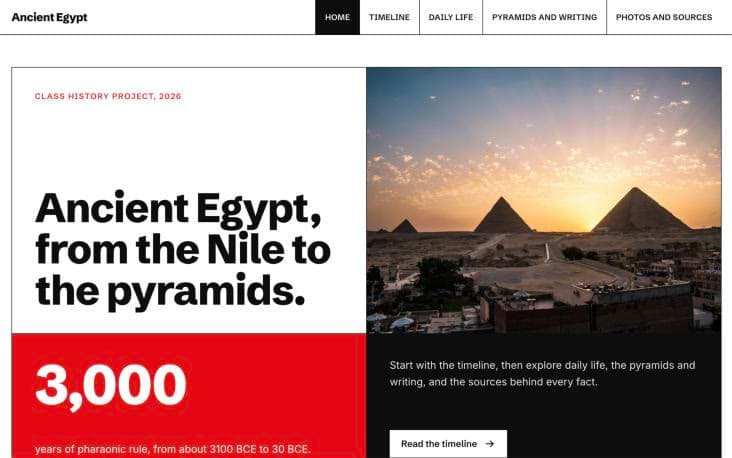
“A history project website about the ancient Egyptians for a class presentation. Include a timeline, sections on daily life, the pyramids and writing, photos with captions, and a sources section. Warm sandy colors.”Build this
Make it a better project
- Check every fact. Compare what is on the page with your notes and sources. Remove anything you can't back up.
- Credit your sources. Photos added by Kodebloc come from Unsplash and are credited on the page. Add your own sources for facts and quotes.
- Make it accessible. Clear headings, good color contrast and photo descriptions help everyone read it. Our accessibility guide shows what to check.
- Look under the hood. Every Kodebloc website is real HTML and CSS. Choose Download from your website's menu to save the file, and open it in a text editor to see how it is made. What is HTML? explains what you will find.
- Try it on a phone. Teachers and classmates may open it anywhere. See responsive design.
Hand it in
Press Publish to put your project online, then copy the link and share it with your teacher. In the publish window you can untick Show in the community gallery to leave your project out of the gallery. It is still public: anyone with the link can open it. You can update the website later, or take it offline when the term is over. Read publish your website and update or take down a live website.
You need an account to build, and you must be at least 13. If you are under 18, you need your parent or guardian's permission. Kodebloc is free while in beta.
Build your project websiteStill stuck?
Send us a message on the contact page and we'll reply by email.