Event website
One page for a birthday, club meeting, fundraiser or workshop, with the date, place, schedule and a way to reply.
An event website puts everything guests need in one link: what is happening, when, where, and how to say they are coming. It is easier to share than a flyer and easier to update than a group chat. Kodebloc builds one from a few lines about your event, and the RSVP form on it really works once you publish.
What to put on an event website
- The name, date and time. Right at the top, big and clear. Include the time zone if guests are coming from far away.
- The place. The venue name and full address, plus parking, the nearest bus stop or which door to use.
- What it is about. Two or three lines. For a fundraiser, say what the money is for. For a workshop, say what people will learn.
- The schedule. A simple timeline: doors open, the main part, food, the end.
- Hosts or speakers. Who is running it, with a line about each.
- What to bring or wear. A dress code, a gift note, equipment for a class.
- Questions and answers. Can I bring a friend? Is there food for vegetarians? Is it free?
- An RSVP or sign-up form. On a published Kodebloc website, every reply lands in your Messages inbox in Kodebloc and is emailed to your account address. You don't need to set anything up.
Tips for your request
- Give the real details. Name, date, start and end time, address. Anything you leave out, the AI fills with sample details, and a wrong date on an invite is worse than none.
- Say what the form should ask. For example: name, email, number of guests, and food needs. The AI builds the form with those fields.
- Set the mood. A child's birthday, a book club and a charity gala should not look the same. Words like "bright and silly" or "elegant and calm" help.
- Keep it to one page. Most events fit on one page, which is easiest for guests on a phone. Choose Multiple pages only if you really need, say, a separate page for a long program.
- Don't ask for private data. Ask only for what you need. Form fields that look like passwords, card numbers or government ID numbers are dropped and never saved, and a page that asks for a password can't be published.
Want a head start? The Event invite button on the Kodebloc home page starts a build from a ready-made request with a date highlight, schedule, hosts, venue and RSVP section.
Requests ready to build
Press Build this to start from one of these, then put in your own details.
“A fun one-page website for my daughter's 8th birthday party on Saturday, June 13 from 2 to 5 pm at Riverside Park. Bright colors, a short schedule with games and cake, what to bring, and an RSVP form asking for the child's name, a parent's email and any allergies.”Build this
“An event page for a charity bake sale run by our school's parent group to raise money for new library books. Include the date, time and place, what we are selling, how to donate baked goods, a progress note about our goal and a volunteer sign-up form.”Build this
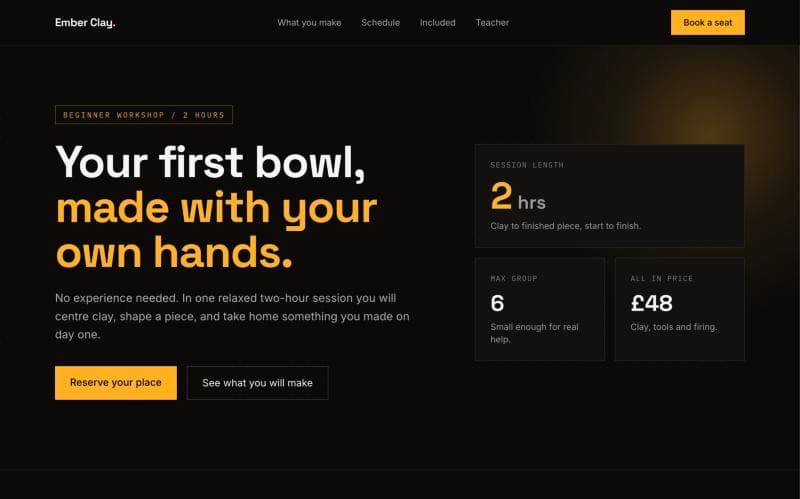
“A website for a two-hour beginner pottery workshop. Calm, earthy look, what you will make, the schedule, what is included in the price, what to wear, a short bio of the teacher and a booking form with name, email and preferred date.”Build this
Share it and keep it current
Press Publish to put your event online. The website gets its own address that you can send in a message or print on a poster. When you publish, you can untick Show in the community gallery to leave it out of the gallery. That doesn't make it private: anyone with the link can still open it. Read share your website to set the name and picture people see when the link is shared.
Plans change. If the time or place moves, change it in the builder and update the live website. The address stays the same, so everyone who has the link sees the new details. When the event is over, you can take the website offline. See update or take down a live website.
Kodebloc is free while in beta.
Build your event websiteStill stuck?
Send us a message on the contact page and we'll reply by email.