Guides / Build a website
How to write a good website request
What to tell the AI so your website comes out right the first time, with before and after examples.
Why the request matters
The AI only knows what you tell it. If you write “a website for my bakery”, it still builds a full website, but it has to guess the name, the town, the menu and the prices. Guesses are rarely right. A few extra sentences save you many changes later.
You don't need special words. Write the way you would explain your website to a friend who is going to build it for you. The message box takes up to 2,000 characters, which is plenty for a detailed request.
The five things to include
- What it is and who it is for. A bakery, a photography portfolio, a science fair project, a birthday party.
- Real names and details. Your business name, town, prices, opening hours, email address. The AI makes these up when you leave them out.
- The sections you want. For example: menu, about us, reviews, gallery, contact form, map.
- What visitors should do. Call you, book a table, send a message, come to an event.
- The look and feel. Colors you like, and a mood such as calm, bold, playful or elegant.
Before and after examples
A small business
“A website for my bakery”
“A website for Rosa's Bakery in Pune. We bake sourdough bread, cakes and cookies every morning. Include a menu with prices in rupees, our opening hours (Tuesday to Sunday, 8 AM to 6 PM), a short story about how we started, three customer reviews and a contact form. Warm cream and brown colors, friendly and cozy.”Build this
The second request names the business, the town, the products, the sections and the colors. The AI has nothing left to guess.
A portfolio
“Make me a portfolio”
“A portfolio for Maya Chen, a wedding and portrait photographer in Austin. A big photo at the top with her name, a gallery of her work in a grid, a section listing her three packages with prices, a short about section and a contact form for booking. Minimal and elegant, black and white with lots of space.”Build this
A school project
“A science project website”
“A website for my science fair project: Do plants grow faster with music? Sections for my question, my hypothesis, what I did step by step, my results with a simple table, and what I learned. Bright and fun colors, easy to read, for my class and my teacher.”Build this
An event
“Party page”
“A page for Leo's 10th birthday party on Saturday 13 June, 2 PM to 5 PM, at Riverside Park near the big playground. Include the date and place at the top, what we will do (games, pizza, cake), what to bring, and a form where parents can say if their child is coming. Playful, with blue and yellow.”Build this
More tips
Pick the right options first
Before the first build, the options above the message box let you choose One page or Multiple pages and a style. If you want separate pages, choose Multiple pages and name them in your request, like “pages for Home, Menu and Contact”. See websites with more than one page.
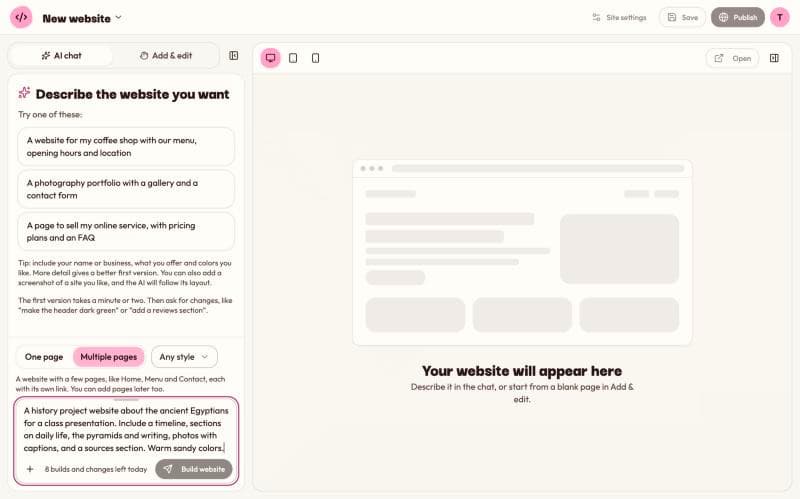
Point to a website you like
If you have seen a website with a look you love, link it in your request with a word like “like” or “inspired by”, for example “in the style of example.com”. Kodebloc reads that page and builds yours with a similar layout. Read build a website like one you like to learn how it works and what not to copy.
Or add a picture
You can also add a screenshot of a design next to your words: click + next to the message box and choose Add a screenshot. The AI follows its layout. See turn a screenshot into a website.
Describe colors in plain words
“Dark green and gold” works fine. If you know the exact color codes from your logo, like #1F5E3B, you can include those too.
Say what to leave out
If you don't want something, say so: “no prices”, “no team section”, “don't show a phone number”.
Writing requests for changes
The same rule works after the first build: be clear about what to change and how. Name the part, then say what it should become.
“Make it better”
“Make the top section taller, use a bigger headline, and change the button text to Order a cake”
“Fix the colors”
“Use dark green for the top bar and the buttons, and a light cream background for the rest of the page”
For a general tidy up of spacing, fonts and colors, you don't need to write a request at all. Click Improve design in the top bar. It keeps your content the same. For more on changes, see change your website by chat.
Common mistakes
- Leaving out your real details. If you don't give an address, phone number or price, the AI writes a made-up one. Always check these before you publish.
- Mixing two websites in one request. Build one website at a time. Start another with New website in the menu with your website's name.
- Asking for sign-in or payment boxes. To keep visitors safe, pages with password or card number fields can't be published. A contact form is fine.
- Starting over too soon. If the first version is close, change it by chat instead of building again. Each new build and each change counts toward your daily limit.
Still stuck?
Send us a message on the contact page and we'll reply by email.